
To remove an authorized user, the primary cardholder should contact the card issuer and ask for the person to be taken off the account. The change generally takes effect right away. If you want to know how to remove an authorized user from your credit, contact the issuer to request removal and ask for written confirmation, then monitor your credit report for 30 days.
Removing an authorized user can affect both people’s credit in different ways. On-time payments and a low balance on the primary cardholder’s account may have helped the authorized user’s score; late payments or a high balance may have hurt it. This guide explains what authorized-user status means, how to request removal, why someone might end it, and what to know about possible credit-score effects. You’ll also learn what to do if the account still appears on your report.
Key Takeaways
- Understand how authorized-user status differs from joint ownership and what that means for responsibility for the balance.
- Learn which issuer contact options may help you request a change, whether you’re the primary cardholder or the authorized user.
- Recognize how late payments, high balances, and spending decisions can affect either person’s credit.
- Know what to watch for after removal and when credit-report concerns may call for further follow-up.
What Is an Authorized User?
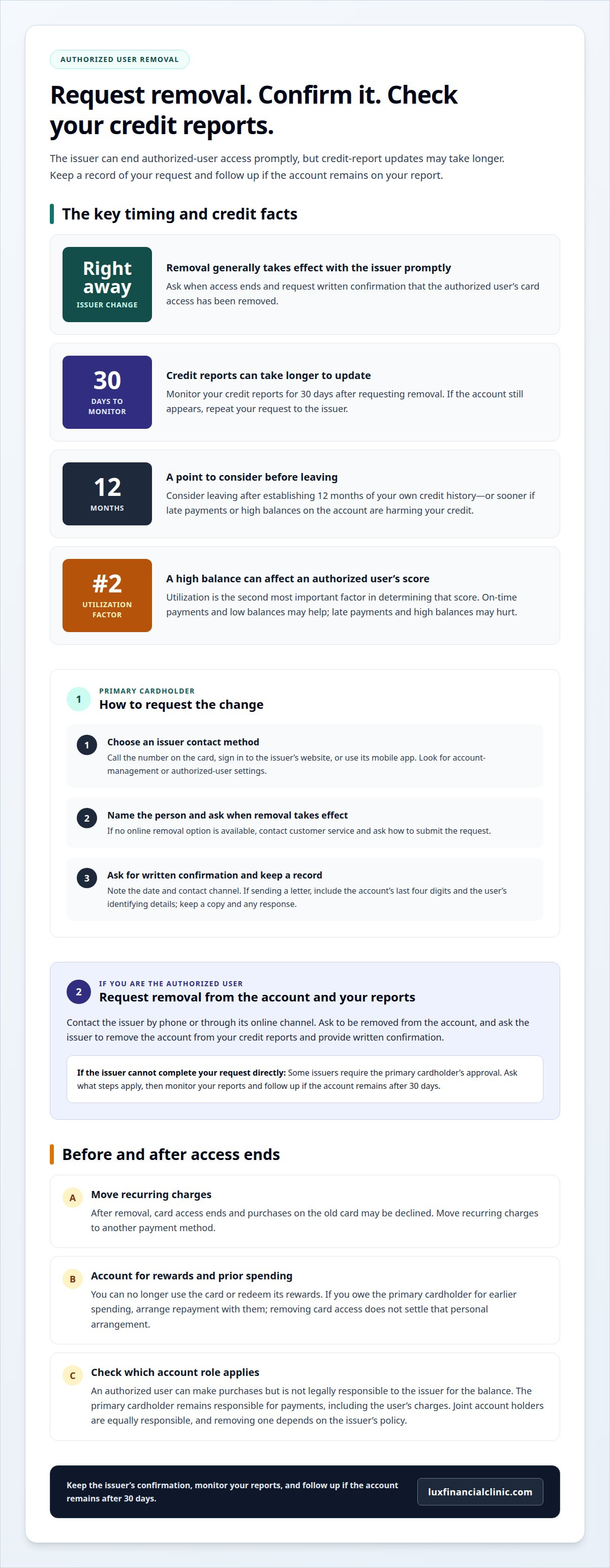
- Understand what the status allows. An authorized user can make purchases with a credit card but isn’t legally responsible to the issuer for its balance. The primary cardholder remains responsible for payments, including charges the authorized user makes. Credit bureaus commonly report these accounts, so account activity may appear in the authorized user’s credit history. How soon does removal reach the three credit bureaus? Removal generally takes effect with the issuer right away, but credit-report updates can take longer. Monitor your reports for 30 days after requesting removal.
- Review how the account affects credit building. On-time payments and low balances on the primary cardholder’s account can help an authorized user build credit. Late payments may appear as negative information on Equifax and TransUnion reports. A high balance can also increase reported utilization and weigh on the authorized user’s score.
- Use the issuer’s online tools when available. Sign in to the card issuer’s online account or mobile app and look for account-management or authorized-user settings. If a removal option appears, follow its prompts and save any confirmation. If the account has no online removal option, contact the issuer by phone or use its other available request method.
- Ask for removal from your credit reports. If you’re the authorized user, contact the card issuer to request removal from the account. Then ask the issuer to remove the account from your credit reports and provide written confirmation. If it remains after 30 days, repeat your request to the issuer.
- Distinguish authorized-user status from joint ownership. Joint account holders are equally responsible for the balance, and removing one person depends on the issuer’s policy. Unlike an authorized user, a joint owner generally can’t separate from the account as easily. Confirm which role applies before requesting a change.
- Choose when to leave thoughtfully. Consider leaving after establishing 12 months of your own credit history, or sooner if the account’s late payments or high balances are harming your credit. If you rely on the account to build credit, plan for another way to establish positive history before removal.
How to contact a card issuer to remove an authorized user
- Choose a contact method. The primary cardholder can call the number on the credit card or sign in to the issuer’s website or mobile app. Look for account-management settings for authorized users. If you’re asking how to remove an authorized user from my credit, begin with the issuer’s account tools. If no removal option appears, contact customer service and ask how to submit the request.
- Make the request as the account holder. Tell the issuer which authorized user should be removed and ask when the change takes effect. If sending a letter, include the account’s last four digits and the user’s identifying details. Keep a copy of the letter and any response for your records.
- Ask for written confirmation. Request confirmation that the person’s card access has ended. The issuer generally removes an authorized user promptly, but keep the confirmation in case questions arise about account access or reporting.
- Contact the issuer yourself if you’re the authorized user. Call or use the issuer’s online channel to request removal from someone else’s account. Some issuers require the primary holder’s approval, so ask what steps apply if the request can’t be completed directly. You can also ask the issuer to remove the account from your credit reports and send written confirmation.
- Settle practical details around access and spending. After removal, you can no longer use the card or redeem its rewards. Move recurring charges to another payment method, since purchases on the old card may be declined. If you owe the primary holder for earlier spending, arrange repayment with them; removing your card access doesn’t settle that personal arrangement.
- Keep the request organized. Note the date, contact channel, and any confirmation details. If you’re still considering how to remove an authorized user from my credit, remember to follow up if the account remains on your report after 30 days. For broader questions about your credit profile, consider reviewing your credit restoration options.
Reasons to remove an authorized user
- Respond to missed payments. Review the primary cardholder’s payment history if you’re an authorized user. Late payments may appear as negative information on Equifax and TransUnion reports. If the account holder has begun missing payments, ending your association can help prevent future account activity from affecting your credit profile.
- Address a high balance. Check whether the card’s balance is rising compared with its available credit. A high utilization ratio can hurt an authorized user’s score; utilization is the second most important factor in determining that score. If the balance remains high, removal may limit the account’s ongoing effect.
- Protect the primary cardholder’s credit. Consider removal if your spending raises the account’s utilization or the balance becomes difficult to manage. For example, a friend’s purchases can increase the cardholder’s reported balance, even when both people initially agreed on a spending limit.
- Act when spending agreements aren’t working. The cardholder may remove a user who repeatedly exceeds an agreed limit or doesn’t reimburse charges as promised. Before making the request, review the purchases and repayment arrangement together. Clear records can help distinguish a misunderstanding from a pattern that requires a firm boundary.
- Reassess access to the account. A change in a relationship or household arrangement can make shared card access impractical. If the authorized user has the card number, the cardholder can ask the issuer whether it can issue a replacement card with a new number. This can address access concerns alongside removal.
- Consider a spending limit as an alternative. If the account is otherwise working well, ask the issuer whether it allows a separate limit for authorized-user spending. A limit may suit a cardholder who wants to retain shared access while setting clearer boundaries. Choose removal instead if the existing arrangement no longer supports trust or manageable account use.
How long does it take for authorized-user status to end after removal?
- Separate account access from credit-report timing. An issuer’s removal of an authorized user generally takes effect right away. Credit reports may take longer to reflect the change, so the account’s continued appearance shortly after removal doesn’t necessarily mean card access remains active. Keep the issuer’s confirmation to distinguish these two steps.
- Start a 30-day follow-up window. Monitor your credit reports for 30 days after requesting removal. The account should automatically fall off the authorized user’s report once the issuer processes the change. Check whether the account has disappeared, rather than relying only on a status label that says “terminated.”
- Repeat the issuer request if the account remains. If the authorized-user account still appears after 30 days, contact the card issuer again. Ask whether the removal was processed and request that the account be removed from your credit report. Keep a record of each contact and any written confirmation, so you can track what remains unresolved.
- Address a report that still shows the account. An authorized user who cannot get removal through the cardholder or issuer can write to the credit bureaus to dispute the account’s status. Explain that you were an authorized user and requested removal. Documentation isn’t required for this dispute, but a clear written account helps identify the issue.
- Use the mortgage timeline only when it applies. After a rapid rescore for a U.S. mortgage application, the credit file automatically updates within 48 hours. This timeline relates to a mortgage rapid rescore, not every standard removal request. For an ordinary request, use the 30-day monitoring period and follow up with the issuer if the account remains.
- Confirm the result before relying on it. Once the account disappears, review the report again for accurate account details. Removal ends its role as an authorized-user account on that report; it doesn’t erase other credit history or change unrelated account information.
Lux Financial Clinic
Lux Financial Clinic can help you understand how an authorized-user account fits into your broader credit profile. The card issuer handles removal. If inaccurate negative items remain on your reports, credit repair may be a useful next step. Lux Financial Clinic offers Basic/Repair and Comprehensive/Build credit repair packages, using structured dispute protocols to address inaccurate collections, charge-offs, and late payments.
Consider a Financial Diagnostic Consultation if you want a clearer view of the issues affecting your credit and possible next steps. This support can be useful after you’ve contacted the issuer or when you’re reviewing concerns beyond authorized-user status. Credit repair does not replace the issuer’s removal process or guarantee a particular score outcome.
Contact Lux Financial Clinic to discuss your credit profile and whether its services align with your needs.
Choose a Clear Next Step for Your Credit
After deciding what to do about authorized-user access, consider what you want your own credit profile to support. Review your reports for unresolved concerns or inaccurate negative items that may need attention. This can help you distinguish an account change from broader credit-repair needs.
If you’re figuring out how to remove an authorized user from your credit, keep the issuer’s response and your credit-report follow-up organized. These records can help clarify what to do if the account information doesn’t reflect the change. For other inaccurate items, credit repair may provide a structured way to address them.
Lux Financial Clinic offers credit repair services and business funding consulting. If guidance on your credit profile would help you move forward, contact Lux Financial Clinic today. A deliberate next step can bring greater clarity to your financial path.
Frequently Asked Questions
How do I remove an authorized user from a credit card account?
The primary cardholder should request removal through the card issuer, then confirm that the authorized user’s card access has ended. The cardholder can sign in to the account and look for authorized-user controls or contact customer service. Keep the confirmation and note the request date. Removing an authorized user doesn’t close the primary cardholder’s account or erase its payment history from their own credit report.
Can the primary cardholder remove an authorized user, or can the authorized user request removal?
Either person can contact the issuer, but the primary cardholder usually controls who remains on the account. An authorized user can ask the issuer to remove them, though some issuers require the primary cardholder’s approval. If you’re the authorized user and the issuer can’t process your request, ask the primary cardholder to submit it.
How do I contact a credit card issuer to remove an authorized user?
Call the customer-service number on the card, use the issuer’s online account, or send a letter if that option is available. Identify the account and the person to remove. The cardholder can include the account’s last four digits in a letter. Ask for written confirmation, and keep a copy of your request and the issuer’s response.
How does removing an authorized user affect their credit score and credit history?
The effect depends partly on what the account contributed to the authorized user’s credit profile. If it showed on-time payments and a low balance, removing it may mean those helpful details no longer contribute. If it had late payments or high utilization, removal may reduce those negative effects. The authorized user’s separate accounts and payment history remain distinct.
Does removing an authorized user affect the primary cardholder’s credit score?
Removing an authorized user doesn’t by itself close the primary cardholder’s credit card account. The account’s balance and payment activity continue to matter. If the authorized user’s spending raised the balance, removing their access can prevent further charges and may help lower utilization over time. The effect depends on the balance and the cardholder’s other credit activity.
What steps can an authorized user take if a credit report still shows the account after removal?
First, contact the issuer’s credit-reporting department and request removal of the account from your credit report. Ask for written confirmation and retain the original removal request. If the account remains after 30 days, repeat the request. If the issuer or cardholder can’t resolve it, write to the credit bureaus disputing the account’s authorized-user status; documentation isn’t required for that dispute.


